Free & open-source dictation for macOS
Speak.
It’s written.
Press ⌘⇧D in any app and talk. Lirrly Pro turns your voice into clean, polished writing — pasted right where your cursor is.
brew install --cask m55h11r11/lirrly/lirrly
- Apple Silicon
- macOS 12+
- Open source · AGPL-3.0
Animated demo: a sentence is dictated with filler words, Lirrly polishes it and pastes the clean version; an Arabic sentence follows, kept in its original dialect.
Three seconds to written.
-
01 Press
⌘⇧D from anywhere on your Mac. No window to find, no app to switch to.
-
02 Speak
Say it how you’d say it. Fillers, false starts, thinking out loud — all fine.
-
03 Pasted
Polished text lands at your cursor. Your clipboard is restored, like nothing happened.
Your dialect… not textbook Arabic.
Lirrly keeps your words the way you said them — no forcing them into formal Arabic, no breaking your sentence.
- Hijazi
- Najdi
- Egyptian
- Levantine
- Gulf
Arabic-first
Dictation tools flatten Arabic into Modern Standard. Lirrly keeps your dialect — Hijazi, Najdi, Egyptian, Levantine — the way you actually talk.
Right-to-left history, dialect-preserving cleanup, and recognition tuned with your own dictionary. Built by a native speaker who was tired of tools that couldn’t keep up.
Private by architecture,
not by promise.
No account, and nothing of Lirrly’s anywhere in your dictation path — your voice goes straight from your Mac to the Groq key you own. Diagnostics exist, they’re opt-in, and they ship switched off.
-
Key in the Keychain
Your API key lives in the macOS Keychain. The interface never sees it — not even once.
-
History stays home
Your last 200 dictations live in a local file on your Mac. Search it, copy from it, or delete it — your call.
-
No account. Analytics off by default.
Nothing to sign up for. Your speech reaches Groq under your own key and goes nowhere else — unless you switch on crash reports, or send feedback yourself.
-
Audio goes one place
Straight to the transcription engine you configured. Nowhere else, ever.
Transforms
Select. ⌥T. Transformed.
Select text in any app — an email, a doc, a chat — press ⌥T, and the active transform rewrites it in place.
Animated demo: a rough sentence is selected and rewritten by transforms — made formal, fixed, or translated to Arabic — in place.
- Rewrite
- Make formal
- Fix grammar
- Summarize
- Translate
…or write your own transform in plain words.
A home for your voice.
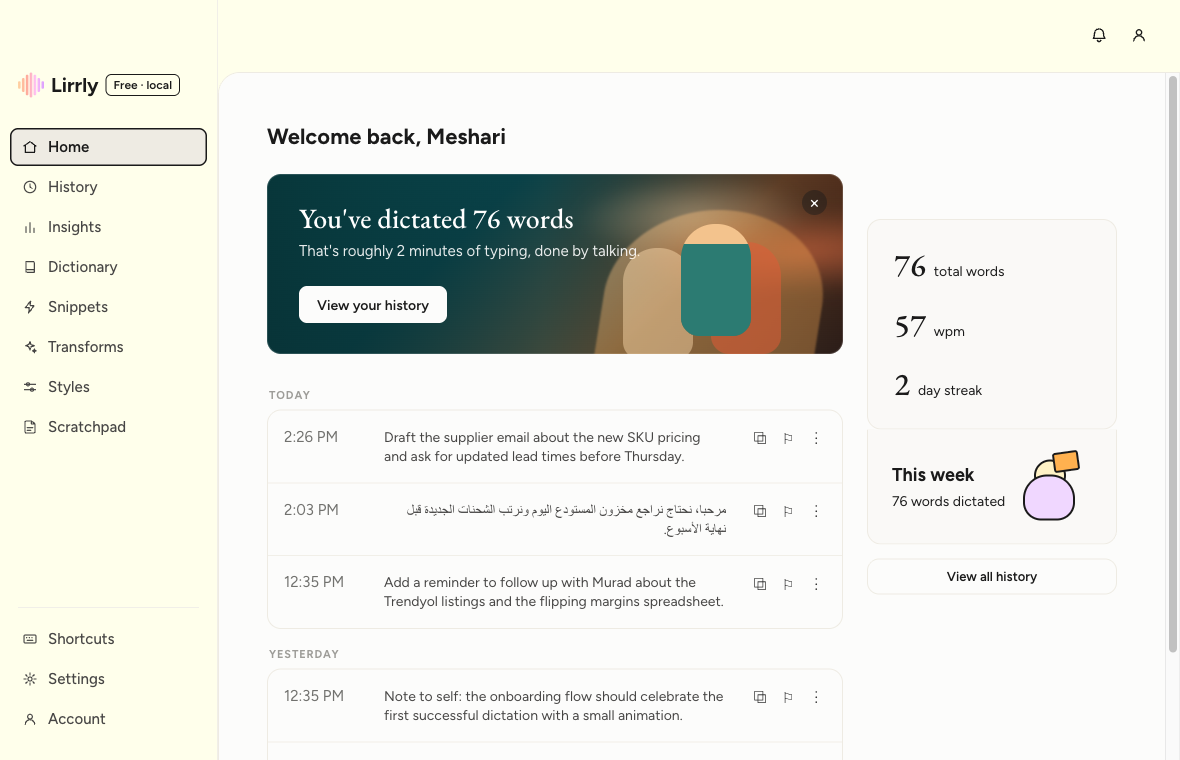
History with honest words-per-minute, a personal dictionary that biases recognition, snippets, per-context styles, and insights — all local.

Free as in
actually free.
AGPL-3.0 and built in the open — read every line that touches your voice, fork it, and any distributed changes stay open. The app is free; you bring your own free Groq key.
Being honest about what’s next
- Command mode
- Scratchpad
- Local engine — offline, $0
Free, open-source macOS dictation — Arabic-first. Tauri + Rust + React.
Questions, answered.
Is it really free?
Lirrly Pro is free and open-source under AGPL-3.0 — no account required. You connect your own free Groq API key for transcription. (Paid extras may arrive later; the open-source app stays free.)
Which languages does it handle?
Everything Whisper is good at: English, Arabic — with dialects preserved — Spanish, French, German, Italian, Portuguese, Hindi, or auto-detect.
Where does my audio go?
From your microphone straight to the transcription engine you configured — Groq today, a local on-device engine on the roadmap. Nothing of ours sits in between: the audio, and the text that comes back, belong to the Groq account whose key you supplied, under Groq’s terms.
Why do I need a Groq key?
Lirrly has no backend, so you plug in your own key (free at console.groq.com). It’s stored in the macOS Keychain, never shown to the interface again, and sent to exactly one place — Groq, to authorise your own requests.
Does it run on Intel Macs?
Builds target Apple Silicon on macOS 12 or newer. Intel may compile from source, but it isn’t tested or supported yet.
Stop typing.
Start talking.
brew install --cask m55h11r11/lirrly/lirrly
Free & open-source · AGPL-3.0 · Your key, your Mac, your words